


Start with the work that keeps getting stuck
A customer sends an inquiry. Someone copies it into a customer relationship management system, checks a calendar, drafts a reply, and reminds a colleague to follow up. Each step seems small. Together, they create a process that depends on people remembering what happens next.
Before choosing an AI tool, identify the broken handoff. Are details missing? Is the same information entered twice? Does nobody own the next action? The answer helps separate two related ideas: AI integration and AI automation.
Integration connects the pieces
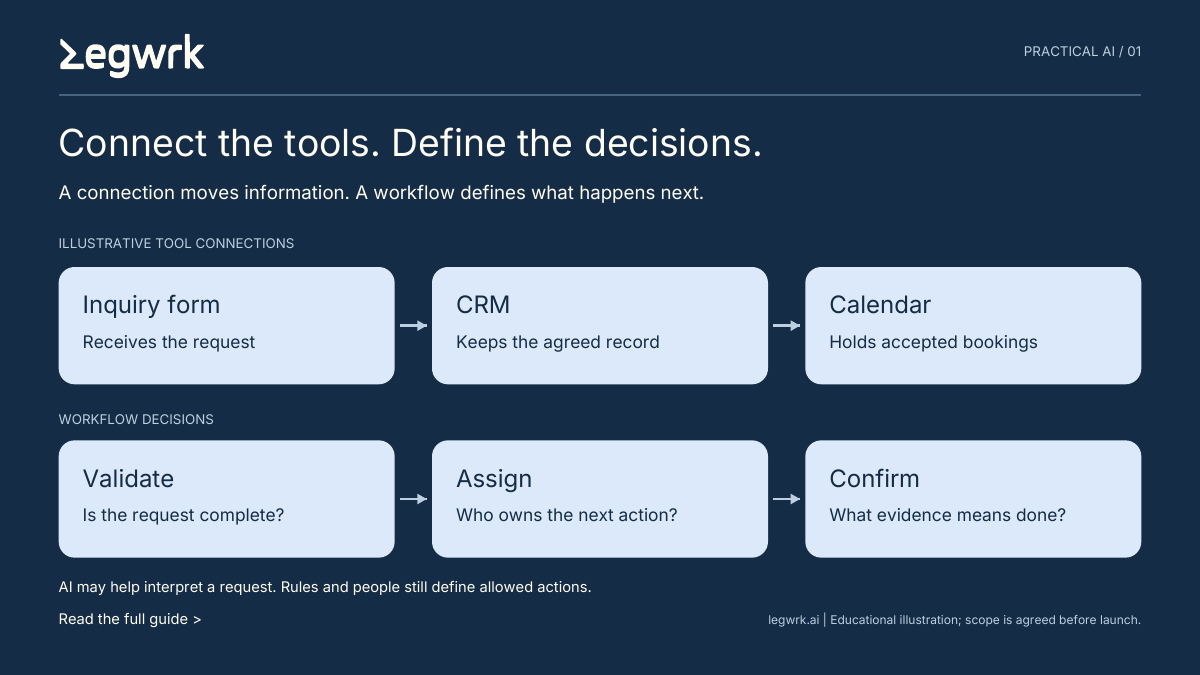
AI integration connects an AI capability with the applications and information a business uses. That might let a system read an approved knowledge base, summarize an inquiry, or prepare a draft inside an existing workflow. Integration makes information available where it is needed.
A connection alone does not create a reliable process. You still need to decide which records are authoritative, what access is necessary, and how changes are recorded. A useful integration should have a defined purpose, an accountable owner, and a clear way to disconnect it.
Automation moves the work forward
Automation defines what happens after a trigger. A new inquiry might create a task, notify the assigned person, and start a response timer. Many steps can use ordinary rules. AI may help where the input needs interpretation, such as summarizing a free-text request.
Consider an illustrative workflow: a website inquiry becomes a CRM record, AI drafts a short summary, and a team member reviews it before replying. The connections are integration. The sequence, routing rules, review step, and stop conditions are automation. This example describes a possible design, not an existing LEGWRK installation.
Choose the simplest method that fits
If a rule is predictable, write the rule. A required field check or a reminder after an agreed interval does not automatically need AI. Use AI where language or variation makes a fixed rule less useful, and define what happens when its output is unclear.
Do not automate a process nobody can explain. First write the current steps, remove unnecessary handoffs, and agree on the desired outcome. A smaller, understandable workflow is easier to test and maintain than a broad system with unclear responsibilities.
- Need help drafting inside one existing tool? Evaluate its current AI feature and review settings first.
- Moving predictable fields between two tools? Evaluate an ordinary connection and fixed rules.
- Interpreting varied requests? Consider a bounded AI step with representative tests and human review.
Scope the first project before connecting accounts
Start with one frequent workflow whose mistakes are recoverable. Collect representative examples, including incomplete requests and unusual cases. Confirm which tools are involved, who can approve access, and whether the necessary data is accurate enough to use.
Discuss setup, agreed integrations, monitoring, and monthly review as part of the plan. Usage and scope should be agreed before launch. Ask who handles failed runs, how changes are requested, and what support covers. Those details matter as much as a demonstration that works once.
A one-page scope you can bring to the first conversation
Use the outline below to turn a broad request into a project someone can test. The example is illustrative; it is not a description of a deployed LEGWRK workflow. Replace every example with the rules your team actually follows.
- A connection is ready when a representative record moves correctly, access is appropriate and failures are visible.
- An automation is ready when the entire sequence, including stops and recovery, meets the agreed tests.
- A useful demonstration includes an awkward case, not just the happy path. Ask to see one.
| Decision | Example answer | What to verify |
|---|---|---|
| Trigger | A new website inquiry arrives. | Which form and which submission identifier start the work? |
| Desired outcome | An assigned team member can see a complete follow-up task. | What fields make the task ready to use? |
| Source of truth | The CRM owns contact details; the calendar owns availability. | Who can correct each record and how do changes synchronize? |
| AI step | Draft a short summary from the inquiry. | Can the summary be traced to the original text? |
| Human decision | Review the proposed response before sending. | Who is responsible when the usual reviewer is unavailable? |
| Stop condition | Do not send after the customer opts out or the case closes. | Does the system recheck the latest state immediately before sending? |
| Recovery | Hold an uncertain outcome for reconciliation. | Can staff see the attempted action, its time and the next safe step? |
Judge the result by what improves
Measure response time, missing information, duplicate records, manual corrections, and completed handoffs before and after the pilot. Keep the workload comparable and include the time spent reviewing AI output. Faster processing is useful only if the result remains accurate and manageable.
The right starting point may be a connection, a rules-based workflow, an AI-assisted step, or a combination. Bring a real process and a clear problem to the scoping conversation. The goal is a business that follows through consistently: more customers, less LEGWRK.