


Treat the handoff as the product
A receptionist, a calendar, and a customer relationship management system can each work well on their own while customers still fall between them. The weak point is often the transfer: an inquiry is captured, but nobody confirms the appointment or records the next action.
Connecting these tools should make the handoff visible and accountable. Start by describing what a successful customer journey looks like, including what happens when the customer is not ready to book or the requested appointment is unavailable.
Decide what each system owns
Choose one place to maintain customer contact details, one source for appointment availability, and one owner for the next action. Decide how corrections move between systems. Otherwise, a calendar change can leave an outdated appointment in the CRM, or a second inquiry can create a duplicate contact.
Document the minimum information needed at each stage. A request for a callback may need less information than a confirmed booking. Avoid collecting extra details simply because a form supports them, and make it clear which fields require a person's judgment.
Map an illustrative inquiry-to-appointment flow
The following is a planning example, not a claim that a particular LEGWRK connection is already live. Adapt it to your actual tools, staffing, and customer expectations.
- Capture the inquiry and record the customer's requested next step.
- Check for an existing contact using agreed matching rules; send uncertain matches to a person.
- Assign an owner and create a visible task.
- Check the authoritative calendar before offering available times.
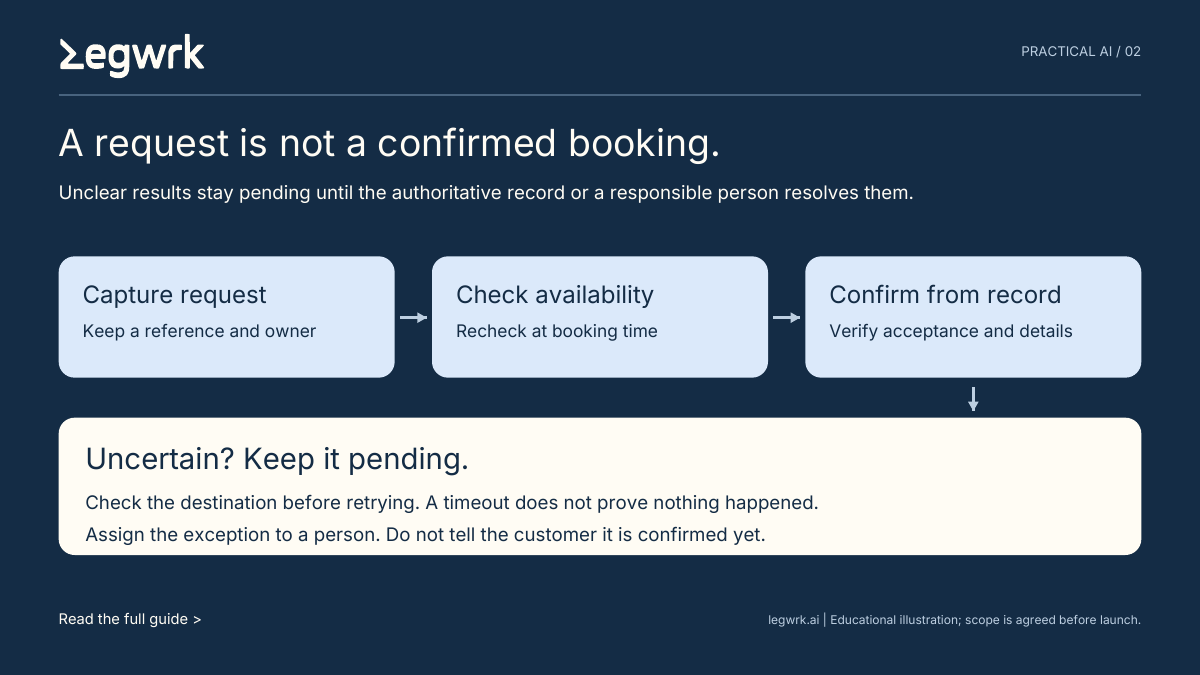
- Confirm a booking only after the calendar accepts it.
- Record the appointment reference and next action in the CRM.
- Notify the owner when any step cannot complete.
Keep interpretation separate from commitment
AI may help summarize a conversation or suggest a category. That is different from committing the business to an appointment, a price, or a promise. Define what the system may draft and what a person must approve before anything reaches a customer.
Unclear requests need a handoff, not a confident guess. A request outside normal service hours, conflicting contact details, or a change to a sensitive arrangement should reach the appropriate team member. The customer should not have to repeat everything because the workflow stopped.
Availability can change between checking a slot and booking it. Design for that possibility. If the slot is gone, offer the next approved step rather than sending a confirmation that the business cannot honor.
Test the paths that are easy to overlook
A clean demonstration is only the beginning. Test repeated submissions, missing contact details, cancellations, rescheduling, two people requesting the same slot, and temporary connection failures. Confirm that retrying an operation does not create multiple appointments or repeated messages.
Use sample records in an appropriate test environment. Check what the staff member sees, what the customer would receive, and whether the record shows what happened. A useful test follows the whole journey rather than stopping when the first system reports success.
Agree on a manual fallback before launch. Staff should know how to find unresolved inquiries, take ownership, and record the outcome without relying on the automation being available.
Test the exceptions before the first real booking
The following is an illustrative acceptance-test worksheet. It does not certify a LEGWRK installation or any named provider. Run these scenarios in an authorized test environment with synthetic contacts and appointments before using real customer data.
| Scenario | Expected behavior | Evidence to keep |
|---|---|---|
| The same inquiry is delivered twice. | One intended task or booking is created; the duplicate does not produce another message. | Event identifier, resulting record and duplicate disposition. |
| A requested slot becomes unavailable. | The customer does not receive an unverified confirmation; offer an alternative or hand off. | Availability check and final booking result. |
| A customer changes the appointment. | The new appointment occurrence is tracked and old reminders cannot fire for the previous time. | Old and new occurrence identifiers and reminder state. |
| A customer cancels before a reminder is sent. | The latest cancellation is checked before dispatch and the reminder stops. | Cancellation time, dispatch decision and outcome. |
| A booking request times out after submission. | Mark the outcome uncertain; reconcile before attempting it again. | Original request identifier and reconciliation result. |
| A person lacks permission to view the record. | The request is rejected without exposing the record or performing the action. | Access decision without unnecessary personal data. |
| The service is unavailable. | A named person receives a useful exception and can follow the manual process. | Alert delivery, owner and recovery outcome. |
Agree which failures stop launch. Keep the test result with the exact workflow version, and repeat the affected tests when a connection or rule changes. A successful test of one integration does not establish that every industry, provider or account configuration behaves the same way.
Launch with someone responsible for the result
Define who checks exceptions, how quickly they respond, and how issues are escalated. Review completed and failed handoffs during a limited pilot. Measure missed inquiries, booking errors, duplicate records, and time to a meaningful response.
Before launch, agree the setup, integrations, usage, scope, monitoring, and monthly review. Keep the first workflow narrow enough to understand. The goal is a dependable path from inquiry to the right next step, with a person ready when the process needs judgment.